At the first Homebrew Website Club in NYC. Hoping to make it a regular thing. Anyone interested for next time?
Category: Indieweb
MapThis article from last March popped into my feed again. And Dave Winer keeps popping up on this issue since, usually saying the same things. I keep seeing these things on various sites.
I’ve disagreed with members of the Indieweb community on many things….usually respectfully. I don’t understand Dave Winer’s venom on this matter. I very much respect what he’s done, and still use RSS regularly. But I really don’t like how he seems to be clinging to RSS. It seems to be, if you criticize RSS and think there is a different way, you are no friend of his.
In every community, there are hardliners. And certainly, many Indieweb people are very definitive in their views. But most recognize that you cannot just only support new standards and not have at least some support for older ones. You have to transition between the two.
In identifying the Feeds page of the Indieweb wiki as indicative of a philosophy, he is missing the point. The page identifies several trends. XML has been supplanted in many areas by other delivery methods…JSON, for example. Leaving aside HTML as a form of XML, the criticisms of traditional feeds are all legitimate ones.
So, in the end, the idea of embedding your feed markup inside your web page has some very real advantages. It means enhancing your site, rather than generating another copy of it in a different format. I appreciate that.
I also agree with Mr. Winer, if we “can get uptake for the formats they would like to replace RSS with, then everyone will support them. Until then, we use what works — for us.” Who is stopping you, sir?
If you think that you cannot adopt part of a group’s philosophy without having to buy into it all, then you would be wrong. We’re not working against you. We just disagree with you on one point. Let’s just agree to disagree and focus on moving forward the points we do agree on.
Some Developments in My Developments
As many of you who have been watching know, I’ve taken up WordPress development as part of my involvement in the Indieweb movement. So, this is sort of a status update.
After developing a lot of my tools on Github, I’ve decided to move them where people can use them, the official WordPress repository. I’ve added two of them so far, the ones I’ve deemed ready for other people to try.
- Post Kinds – Allows WordPress posts to respond and interact with other sites, as well as certain passive post types.
- Syndication Links – A basic plugin that adds links to other sites to the bottom of a post. If you check this post, there are icons indicating I sent a link to it to Facebook, Twitter, so on.
So far, if you watch this site, I haven’t been posting much. Need to work on that. I do seem to have users though. Most notably, one in Australia. I say notably because compared to my sporadic posting, my plugin is in regular use by someone, which encourages me to evolve and iterate…and even add some features I didn’t think of.
I now support passive kinds of posts. This would be actions like Listened To, and Watched. I’d better start listening and watching things.
But most importantly, I’ve always felt myself a horrible programmer, since I gave up on it many years ago. Having a project that I enjoy doing for myself, and at least a few other people are using, inspires me to try to be better. I think I’ve graduated to mediocre programmer. If I keep at it, I might get to decent.
Post Types, Post Formats, Post Kinds
In my recent development of the Post Kinds plugin, I’ve felt the need to try to explain what exactly a Post Kind does. I needed a way to distinguish the custom taxonomy I’d created. So let’s define the competition for the terms…
- A Post Format is a piece of meta information that can be used by a theme to customize its presentation of a post. Confusingly, the slug for post formats is ‘type’.
- A Custom Post Type is a single item of what is generally called a post, although post is also a specific post type. It is more a custom content type.
- A Taxonomy is a grouping mechanism for some posts.
- A Post Kind is a taxonomy that allows posts to be classified according to the kind of post it is.
So, not so much of an invention as a necessity to distinguish from similar concepts
They have gone through some changes. But, at the moment, they are designed as a drop-in replacement for post formats. There are actually many good reasons why the WordPress developers decided a set of standardized formats would make sense…most notably the ability to change themes without losing your customization. Fewer and fewer people are using post formats, however.
Indieweb Post Kinds are designed the same way. The two can exist simultaneously, but you are better off disabling formats in favor of a single solution.
As more and more sites incorporate concepts like “Like’, ‘Favorite’, and so on, one’s own site should support these. This allows for that.
The plugin supports sending webmentions via the WordPress Webmentions plugin, to send notices to other sites you might be ‘liking’, replying to a post on, etc…assuming the other site supports it. But more and more indieweb sites are doing so.
Updated Response Display
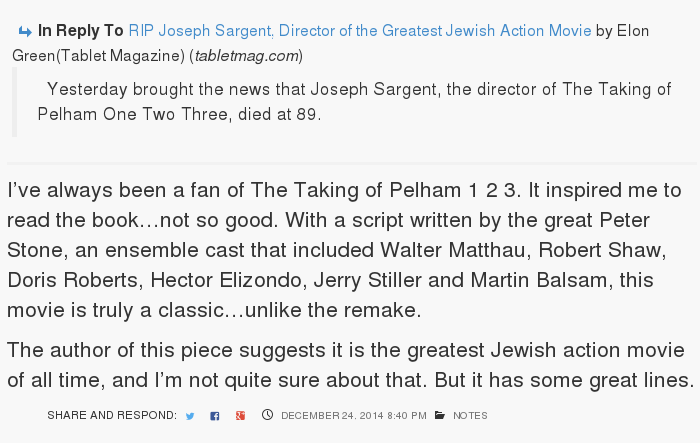 On the 23rd of December, I completed a major update to this site, as part of a commitment to do so by 2015. I often forget to document these changes.
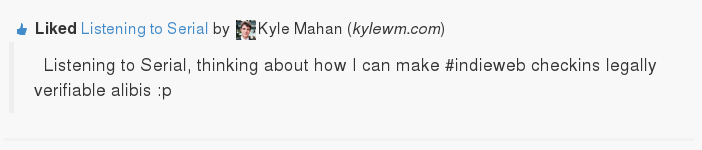
I redesigned and updated the portion of the post that shows what a post is in response to(for those that are in response).
Unlike the previous, this blends in with the background of the post itself, and adds in support for an author and profile picture.
I’ve captured two examples of that in this post for posterity.
More coming, but feedback is appreciated.
Indieweb 2014 End of Year Summary
I found out about Indiewebcamp in March of 2014, so I have not yet been involved with it for a complete calendar year. But, I’ve decided, with the end of 2014 approaching, to take stock on how I’m doing, and can reassess next year.
As part of this evaluation, I am using the Indiemark system, a set of metrics for measuring the indieweb-ness of a site, and a step-by-step approach to incrementally adopting indieweb features.
Identity
Level 2
I own my own domain, and I post h-card contact info and an icon on`my page.
I have given much thought to people-focused communications, which falls under this category. Need to develop this more.
Authentication
Level 1
I have set up Indieauth, which allows me to authenticate to sites using my domain name. But this exposed a bug in one of the libraries indieauth runs on, which has gone up the chain for repair. There is currently no level 2, but a level 2 may include two factor authentication, which I am trialing as a security measure…
Posts
Level 3
My Post Kinds/Taxonomy plugin supports different kinds of content. And while I support the following types, I am actually planning to limit myself due overlap.
- note
- article – longer form content
- reply
- like or favorite, depending on your preference – I have the hardest time with deciding
- photo – post where the primary content is an image
- repost – this is a complete reposting of the original, haven’t really done those
- rsvp – only used once. I really need to go more places.
Syndication
Level 2
I syndicate(POSSE) my posts to applicable silos(Facebook, Twitter, Google Plus). I am not currently linking back to the originals, as I previously did, unless relevant, as I haven’t gotten my syndication working the way I’d like.
Posting UI
Level 3
It’s hard to say where I am with this. I have a UI for posting, the WordPress interface, one I created for adding context information for replies, but I’m still not happy with the UI for syndication.
I’d like to work on a simpler UI for the future. The WordPress one is very useful, but has a lot of ‘stuff’ to finish a post. Great for an article, not so great for a note.
Navigation
Level 4
I have previous/next navigation, time based archives, and tag based archive pages, so I’ve covered this category as of now.
Search
Level 4
My site is searchable using the built-in WordPress search functions.
Aggregation
Level 4/5.
Thanks to the work of Matthias Pfefferle, I receive webmentions and show comments and mentions from other people on my site. That achieves the notes for Level 5.
However, I’ve spent a lot of time on reply-contexts, which I am manually entering. My project continues with plans to pull in more of this information automatically, which is more of a Level 4 goal.
Web Actions
Level 3, but not Level 2.
I had hard-coded actions and web actions on my site. They were removed for now, as they didn’t work the way I wanted. They will likely be back.
I do provide syndication links on posts of all other places the post can be found.
Security
Level 5/6
I serve the site now exclusively over https, and redirect anyone requesting a plain unencrypted site. The site supports SPDY for increasing speed over an SSL site.
The site has an A rating with Qualysis SSL Labs. It uses an SHA-2 certificate and supports Mozilla’s Intermediate Compatability Cipher List. This makes it fairly up to date in this category, but I am holding out for the A+.
Miscellany
This site is also now delivered over IPV6 as well as IPV4.
The site runs on Nginx, and uses a caching system I wrote.
Conclusion
One of the most interesting things about getting involved in this group has been building things. I have always loved making things, and have never been good at it. I still think I am a reasonably good idea person, but a horrible programmer.
I still have 4 days in 2014, if I want to build something else.
Contemplating Contact Methods
In my last article, I was contemplating how to handle communications with individuals using this website. Unfortunately, technology isn’t quite there yet. Someone will have to build it. To some part, that might be another hobby for me.
The problem as I explored this that has keep me stalled is the walled garden problem. Sites like Facebook or Twitter want you to embed their code, which does a lot more than open up the service. At the least all these scripts embedded in your website slow it down. Some functions don’t even have the option for integration.
One can’t rely on asking people to install pieces of software, especially the less technically inclined. Which means you need to have a simple solution that takes advantage of what people already have.
So, in terms of instant messaging, we have Facebook and Google Hangouts(formerly Google Talk). Both had support for a common standard, XMPP. Google Hangouts is still backwards compatible with XMPP for who knows how long. Facebook is compatible until April 30, 2015, when they will discontinue support. Neither has an alternative way of accessing their service, other than their own tools.
So, that leaves me with little choice right now but to roll my own solutions. But that is the essence of the Indieweb movement I’ve gotten involved in. Of course, I’m not really a programmer, but I can do some things.
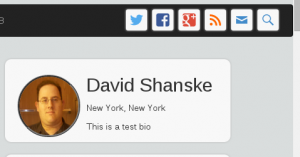 So, if you look at this test for a new configuration for this site(may be in place if you are reading this in the future), I have the links at the time, which are all syndication points…Twitter, Facebook, Google Plus, RSS, etc… other locations to see the same content, if that is the way you want to seem them.
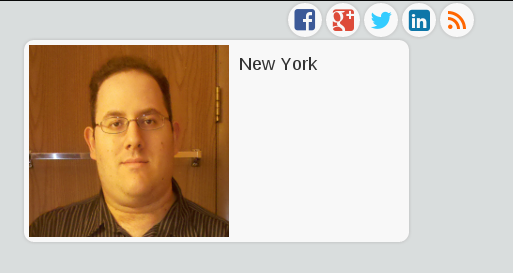
Below the syndication links(aka social media), I have the mockup of the new business card style profile. I want to add communication icons to this card style I have, but other than email, I, at the moment have none. This has been stalling me for some time now. This is not the final version.

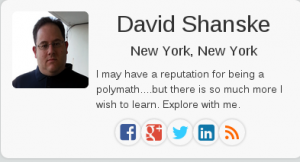
Here is the old layout…I have no better tagline…I really need one. But, I hope to add the buttons for email and other ways to reach me. But I lack many methods.
So, next, I’m thinking of trying an experiment. Setting up some software you can click on the site and communicate with me. You don’t have to know what the protocol is, and it should hopefully work in a browser. There is one individual I saw in researching who allows you to click a link that rings his phone.
So, what do you think? Remember, you can comment using any of the links below. You can even use the contact form on this site by clicking here.
Unified and Contextual Communications
A while back, I was reading Tantek Çelik’s attempt to better define People Focused Mobile Communications. I have had the pleasure of meeting Tantek on two separate occasions at Indiewebcamp events. Ever since I missed a discussion on this matter at the end of this month, I’ve been thinking about it, although not just for mobile.
Tantek asked, “What if our mobile devices focused on people first and apps second? Remember when they used to? When you looked up a person first, and decided to txt, call, or email them second?”
I remember when I used Trillian on Windows, and now Pidgin on Linux to unify my instant messaging contacts. I didn’t have to care if Bob was on AIM, YIM, ICQ(dating myself there, aren’t I?).
I don’t mind installing applications as methods of communication, but that is the plumbing. I don’t see people going off and saying they want to know how their water gets to their sink. They just want it to work. But, as time has gone on, companies have moved away from allowing third-party clients, which means that third-party clients that take multiple services and a common interface may not be possible in the future.
So, that means that any people-focused communication has to tell a service to launch their application to handle it. The proposal would have you visiting the person’s website, see their page that shows methods of communications in order of priority, look for the method of communication, tap/click it, and you are taken to the website/native application that handles that service.
And, if you make the site smart enough, it can change the presentation based on availability and other factors. If you want people to authenticate their identity somehow, it could show different presentations to friends over strangers.
It sounds very nice. But how does one build such a thing? Or even start building toward such a thing. I’ve been building things I myself want to have for my site. .
There are two ways for a web browser to register handlers for specific types of communication. One is outlined in this Mozilla document and shows how websites can register themselves. Gmail, for example, offers to registers itself to handle email. The second is the registering of an app to handle these. This is pretty common on Android, for example…that a specific action can launch an external application to handle it. For example, if I click a Youtube link on a webpage on my phone, it will ask me if I want to open it in the Android Youtube app. Until recently, iOS has done this using URL handling schemes, but apparently in iOS 8, they will be getting something called App Extensions that will allow this functionality.
Even Facebook got into the app to app communications issue at their last developer conference with AppLinks.
So, in the end, the barrier is that the desktop experience is fragmented, the mobile experience slightly less so, but there is currently no way to ensure a consistent communications experience. If you don’t believe me…try clicking this email link. Did it open your usual email or webmail client?
If the web is the medium by which we communicate, and the web is being sectioned off into silos or walled gardens…sites whose goal is to keep your communications and activities wholly inside their ecosystem, then how do you make communications transparent so the person trying to reach you doesn’t have to know what medium you prefer, that is all handled for them?
So, let’s go back to how we build such a thing. For now, it is create a space…a website that tells people where to reach you. In the old days, we’d use a business card…but the modern tools have the same utility.
In the below shot, from one of my previous articles on this site, I have a series of social buttons that tell you how to find me on Facebook, Twitter, etc… but not how to communicate with me.
That will be changing…or at least enhancing…as soon as I figure out how to convey that. In the meantime…you are welcome to try and find me whatever way you wish…
References
Semantic Comments and User Testing
Last month, I unveiled my new theme for this site, which I had spent two weeks working on. There is still a lot I want to fix…not thrilled with the business card in the sidebar and I think it needs work.
But since, I’ve been systematically dismantling everything I built. Not quite. I’ve been taking the theme and breaking off pieces of it into independent plugins. The first of this is the Semantic Comments plugin. This is an extension of the facepile code I created. Facepiles are a row/rows of profile photos of individuals who have completed an action related to the current page…such as Like, Mention, Repost, etc.
It gave me the chance to do something even more geeky. I posted my code to Github. You can visit the repository and download it, criticize it, comment on it, at Semantic Comments. A professional programmer friend of mine told me that you never stop being convinced your code is garbage.
But, one of the more recent decisions I made for this plugin, and thus my site, was inspired by the words of Kartik Prabhu on his site, Parallel Transport, in an article called, “No Comment.”
“Why this expectation that every blog must be a discussion forum? Public discussions can be had on social platforms like Facebook, Twitter, Google+”.
So, comment over there, and I’ll pull your comments in back here. I’ve automated it and it is no trouble. Or comment on your own site. But this is something of a novel idea for people. So I took the comment form out. It was only one line of code anyway. I could change my mind later, I guess.
So, at the bottom of the post, you’ll see some options.

Then, below the comments, you’ll see…
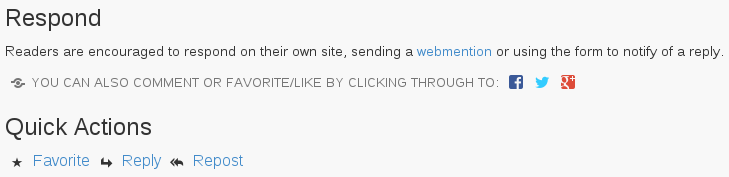
If it is a full article, you’ll see different Quick Actions. The Favorite, Reply, Repost ones go to Twitter. They are the only ones who support this sort of link without demanding I use their social buttons…you know, the ones everyone has.
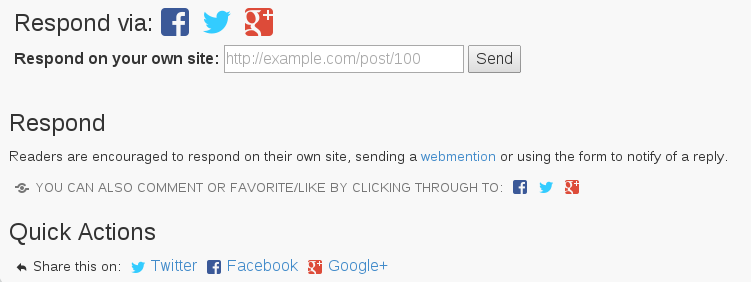
I rearranged the order, I fiddled with the text …and I asked a lot of people if they’d have a look at my test site to see if they understood it. Some of you may have been in that group.
I still haven’t found the magic bullet. Some people told me they thought they needed to paste whatever the link they commented on into the box. Others weren’t sure how they’d respond. It is proof that any new way of doing things may contain a barrier in adoption.
You may have noticed that Twitter, Facebook, Google+, etc all are starting to look very similar. One reason seems to be that people instantly are familiar with portions of the layout.
I’m continuing to iterate, change, try to find the best way to do things, but this is where user testing comes into place. What is missing…what could be better…how can I have the simplest presentation possible with the elements I have?
Thoughts?
Thinking about Social Buttons
Been working on webactions, which are similar to the social sharing buttons on many sites. Does anyone actually use them?
Getting Started with the Indieweb – Part 1

I’ve lately, if you’ve been paying attention to this website, gotten started with a movement called the Indieweb movement. To remind you from last time I mentioned it, the ideas of the movement are:
- Your content is yours
- You are better connected
- You are in control
So, I figured it would be a good idea to write a simple tutorial in case you want to join on this. If you visit the indiewebcamp site, there is a wealth of information. But it seems overwhelming to some. This is my version of things, where I focus on it from the perspective of a non-techie typ. A large portion of the indieweb is about markup. Basically, marking up the elements of your site so they can interoperate with other sites.
- Get your own domain name and web hosting. If you want to own your content, you need to rent a place to put it.
- Put Up a Site. Will cover more of this. I use WordPress as a platform, which is very simple to set up.
- Add Links on the Site to Your Social Network Profiles and Links on your Social Network Profiles to Your Site. These should be marked up with a property called rel-me. This allows you to effectively say that Facebook you, or Twitter you is the same person as your new site, and vice versa. Both have to point to each other to avoid spoofing.
- Put up a Bio/About Page – Good to tell people who you are.
- Start publishing. What is the point of a worrying about some of this other stuff if you have nothing there.
The above doesn’t get into all the markup I mentioned. This is staking your claim for your little piece of the web. Next, I’ll get into the ‘cooler’ stuff. I’m really enjoying getting involved in this.
This site is running WordPress, which is used by roughly 20% of websites. A lot of the functionality I mentioned, as well as what I’ll be talking about on this in the future, can be put into WordPress using plugins. This includes things like syndicating content to other sites and importing content from those locations. It has given me an excuse to start developing and redeveloping code to support this.
So, some of those who follow me may find me being a bit more techie than normal.

Design Obsession
One of the essential principles of the Indieweb is selfdogfooding: Using your own creations on your own personal site. Those who have been following this effort see I continue to make changes. But, what is interesting as I work on design is how the little details can drive you crazy. It is surprisingly challenging.
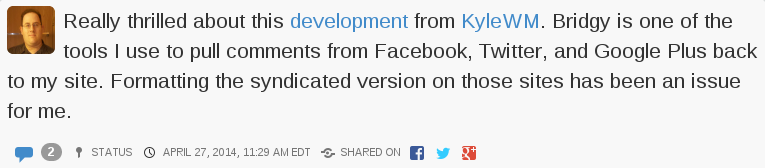
This is an example of a standard status update on the site. The blue icon is the comment icon, and next to it, linked to same, is the number of responses. I can’t help thinking that I don’t need both. But the rest of the line has an icon and information: Status and the Status Icon, the Time and a Time Icon, the Shared Icon with the icons of the sites I syndicated the post to.
If you look at this, which I classify as an article, not a status update, some of that information migrates to the top.
I also wanted to add a business card like area in the sidebar.
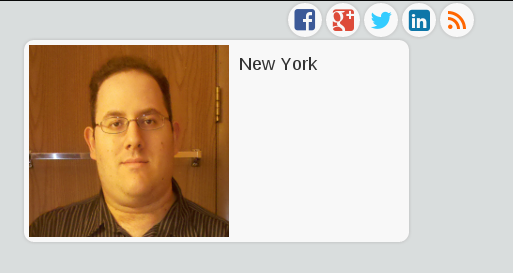
This is not a finished feature…but I’m innovating in public. I spent a lot of time on the other site, but this part is just temporary. You can see the icons that indicate places I syndicate copies of these posts to. I really like the look of those icons, however, they don’t quite fit on the full version on the site. It looks fine if it is on a phone(Yes, the site scales for mobile. Try it.)
Then we get to the profile box. The picture is too big. I probably need a new profile picture anyway, but I’m usually behind the camera, not in front of it. We’ll see what else I can do with this. I’ve been looking at other sites and how people do these sidebar bios.
There actually has to be a picture of me on the front page of the site, much as I don’t really want it, for syndication purposes. The photo is used as an icon for the link should anything I say be replied to elsewhere.
There will likely be more exploratory posts like this. So, here I am, worrying about the smallest detail. No wonder designers boast about chamfered edges and all sort of things users don’t normally focus on. I’ve never heard anyone say…”I see you picked Helvetica as your font. Great choice.”
More on exploring this to come. Feel free to comment on whether you want to hear about it or not. You can comment on the site or over on any of the syndicated networks. It will come back.