Episode 6: WordPress and Types of Posts


In this episode, Chris and I discuss how Post Kinds mapped Indieweb types of posts to the WordPress system and why, the defined as opposed to implied types set up, and avatars.

While this is very WordPress centric, there are a lot of discussions here relevant to a broader Indieweb audience about adding new types of posts to your site, trying to design things flexibly(although a developer’s guide is probably needed), etc.

Episode 5: Indieweb Summit and More

With the Indieweb Summit coming up, we should discuss what the Summit is like, community and how to participate, etc.


Links

  • Do I know anyone interested in building #indieweb tech or federated services? I’m having trouble conceptualizing some things without having people to bounce ideas off of. https://twitter.com/davidlaietta/status/995485455675162626 That’s what this is all about! I have always been an outsider to that community and want to find good ways to enter and get involved, but I am also trying to find ways to make ActivityPub based projects more accessible to the average web user.

Privacy

I admit to a certain amount of frustration on the subject of privacy lately. It seems, in all aspects of my life, both personal and professional, the new data privacy regulations that the EU rolls out May 25th are a theme in every discussion.

I don’t live in the EU, and I know that the European view on privacy is very different than the American one. Anything I say below is my opinion.

I am also an archivist and librarian by education, if not by profession. We learn about the past by reading the materials of the day. The fact that email is so easy to keep and delete makes things difficult for us to archive for the future. Does the right to privacy mean we lose the ability to look back, because we don’t want to remember?

Historical concerns aside, let’s think about today. In the majority of states in the US, only one party partipating in a phone call is required to record a conversation and even post it. Privacy is very lopsided. There is no such thing as absolute privacy.

For me, keeping a copy of communications I was a party to is perfectly acceptable. My website is where I keep my copy. It is not covered by privacy regulations. I have no business agenda there. I will not sell your data or use it for anything else but archiving that conversation.

The thorny issue is whether or not I have the right to display that information publicly. This is because I am, in some cases, copying that data from another service. For example, Twitter or Facebook. Those services got permission to store that information and you have the right to manage it. But you may not know that I have copied it to ask me to remove the public display of your image.

But how is that different than someone creating a screenshot of the post? Which was public information at the time?

As a private individual, I think it is mandatory that I post a policy about what I do. And that I will hide or remove information on request. As a developer of Indieweb tools, I think I should give people the option to not store information if they so choose.

So, I am going to build the tools for people to not collect data. I am going to stop what I am working on and do some of this right now. But I still will. I am going to try to better secure that data. I am going to be clearer about it. That is the lesson I can take away from this and should. That we need to think about privacy impact.

I hope those who are more concerned about this tell me through my site they don’t want me to share our public conversations that they were happy to put in a public forum. I will then restrict them to my eyes only.

In Indieweb terms, I support webmention deletion. If the original source changes and you send a webmention, my site should remove or update my copy.

Disclosure: Your responses to this may be captured for archival purposes. Please advise me if there is an issue.


Episode 3: Syndication

This podcast is partly being used to develop Indieweb podcasting tools for WordPress. As a result, it will get better each time I post. At the time of this post, there was no direct download option being generated, so if there is one here now, I’ve upgraded. Also, duration is missing. But unlike previous episodes, the system will now autogenerate the enclosure for RSS feeds, so you can subscribe. 

The current podcast feed on this site can be found in a variety of ways.

  •  Audio Posts on this Site – This is a feed of all my audio posts.
  • An Indieweb Podcast  – I have something called Series on my site, so this is the feed for this as a series. I probably should have a feed called Podcast.

Co-Host: Chris Aldrich of Boffosocko.com

Show Notes

Facebook has announced ending publishing by API…and David is thinking about what it means for the community and his current project.

History:

ThinkUP from Anil Dash and Gina Trapani ultimately died trying to fight the API wars with various social silos. They spent all their time trying to keep up with no guarantee that the silos would cooperate. All their engineering resources were spent trying to keep up instead of innovating on a stable platform.

Related IndieWeb wiki pages

WordPress Plugins:

Deprecating and Replacing Bridgy Publish for WordPress

I’ve decided to take a different direction for the Bridgy plugin for WordPress. I’ve never quite been able to explain to people it doesn’t actually do anything. It’s a user interface for the Bridgy service. I’ve decided that the best thing to do is to is to change the approach radically.

Bridgy is a service that integrates with various sites…Facebook, Flickr, Twitter, Github, and sends back comments, likes, etc to the original copies of the same posts on your site. There are a few similar services I’ve integrated with. It also has a feature called Publish where it allows you to syndicate your posts to those services.

This is something of an arms race, as APIs change all the time. Sometimes, there is no official established API. Ryan Barrett, the creator of Bridgy, announced in a blog post this week that due to Facebook API changes scheduled to take effect on August 1st, the Publish features of Bridgy for Facebook would be discontinued at the same time.

I’m writing this partly to lay out my plan in my mind as I’m working on writing this now. I’ve gone through a few different versions of this idea before settling on this.

The Bridgy plugin consists of two parts: The first part is a UI that is added to the post editor that consists of a series of checkboxes, and the corresponding code that triggers the same action from a post made over Micropub. The second part was added last summer, and is basically a registration page for registering for Bridgy.

I’ve opened an issue for discussion on whether I should move the second part into the main Indieweb plugin. Newcomers to the Indieweb could install the plugin, register for Bridgy inside it, and instantly start getting backfeed from other sites.

That brings us to the first part. The checkboxes. They will need to be rewritten, if I want them to continue, for the new post editor, Gutenberg, at some point. But, I don’t just want to syndicate via Bridgy. I want to syndicate to anywhere I can or choose to integrate in, both using the WordPress post editor and Micropub.

So, I’ve decided to integrate the top level of this, the logic that gets a request for syndication from the post editor or Micropub, inside Syndication Links.

Syndication Links displays icons which link to syndicated copies of posts. You’ll see them on this post. I keep adding in integrations to other plugins as people ask. I have Mastodon Auto Post, Keyring Social Importer, Medium, Social Network Auto Poster, and a few more. And I’ll likely continue to look at plugins that syndicate to other sites, figure out where they store their data, and display it as part of this plugin.

But now, this second part will expand the plugin into this territory of being a middleman for actually syndicating content. This is similar to what I did in Simple Location, where I have a series of providers for weather, location, maps, etc. and anyone could write a plugin(though only I have so far) that adds another provider.

To start, the first provider I’ll be including will be a rewritten version of Bridgy Publish, as well as my plan to add Indienews, as both are triggered by sending a webmention to a site.

At the point that I finish the alternative with feature parity to the existing code, I will discontinue development on the separate Bridgy plugin. It will mean one less plugin to maintain. Anyone who does not want to use the new features in Syndication Links…they will be off by default to start with.

It also means that, if I wanted to, I could add native publishing support for services in future. While there are certainly no end of Twitter/Facebook/etc plugins for WordPress, none of them quite understand syndicating a favorite to Twitter doesn’t mean a new tweet, it means something else. I can continue to write integrations for other plugins, or add new providers myself.

Not saying I’m going to do that. I’m only committing to what I’ve said above.

Finally, to all of you who liked the Bridgy Publish plugin…I’m curious to hear your comments on this. Bear in mind, I built the Bridgy Publish plugin to use it, and I still never migrated myself over to it. I would like to finally leave what I am using, and this would mean I could change providers without changing interfaces if I ever add something in future.

How I Set Up My Indieweb WordPress Site – 2018 Edition

This is an update to my 2014 article on how I set up my WordPress site. It was requested I update it.

Standard Plugins

  1. Character Count for Post Content and Excerpt(Link) – Because I need to be aware of the 140 character limit of Twitter, one of the services I send my content to, I need to know the character count of what I’m typing. This adds that to my editing screen. No longer using this plugin and could not find a replacement.
  2. EWWW Image Optimizer(Link) – It reduces file sizes for images to ensure faster loading
  3. Pushover Notifications(Link)or the forked alternative Pushbullet Notifications(Link) for WordPress – This plugin sends notifications of site events to my phone. The Pushover version is actively maintained and allows for extensions.
  4. Simple Local Avatars(Link) – Overrides the default of using the Gravatar service for profile pictures to storing them locally. However, this plugin hasn’t been updated in years. May look for a new one.
  5. WordPress SEO by Yoast(Link) – While I’m not obsessive about Search Engine Optimization, I find this plugin assists in my writing by reminding me about the importance of certain elements. While this is still a popular plugin and good for many people, it’s become a bit too aggressive for me.
  6. The SEO Framework (Link) – Sometimes, I think about getting rid of all SEO plugins. I’m not really obsessed with this. This does add non-Indieweb markup for some sites that require it. It isn’t worth it for me to manually add this right now.
  7. Hum(Link) – This is a simple URL shortener. So for each post, there is an equivalent URL address at di5.us. This allows me to give out easier to enter links to longer post titles.
  8. JSON Feed(Link) – Adds a JSON Feed to a WordPress site. This is an alternative to RSS as a feed. I’ve used it to feed my content to Micro.blog more effectively, as the specification was co-created by Manton Reece, who is the creator of that service. The plugin could stand some enhancement.
  9. Series(Link) – Creates a simple taxonomy called ‘Series’. I added this to my site to allow creating series of articles.
  10. WP Photo Sphere(Link) – For the rare occasions that I post 360 degree images. Rare as in I’ve only posted one.
  11. Social Network Auto Poster(Link) – I keep wanting to get rid of this thing. But I haven’t spent the time to replace it. Thinking of doing that soon.
  12. Simple Location(Link) – You can call this an Indieweb plugin, but it isn’t specifically an Indieweb technology(although it does use Microformats markup). It adds location and weather awareness to a post. So, you can click to add your location and the current weather conditions at that location to a post.
  13. Home Assistant for WordPress(Link) – I use Home Assistant for my Home Automation integration. Since it has an API, I wrote this simple plugin. While at the moment, I hope to add the ability to display information from any sensor and to update a sensor on the Home Assistant side from WordPress, I use it right now as an enhancement to Simple Location. Instead of getting my location from the browser, it gets it from my Home Assistant installation, which tracks my presence.

The Indieweb Stuff

  • WordPress Webmention(Link) – Adds webmention support for WordPress. This allows communications between sites.
  • Semantic Linkbacks(Link) – Adds richer content to WordPress comments received by Webmention. For example, interprets them as reply, repost, like, favorite, mention, etc. This allows different displays and actions to be done with them.
  • Semantic Comments(Link) – One of my own plugins. It changes the display of WordPress comments based on the information from Semantic Linkbacks. It presents the profile pictures in a Facepile for the various types of mentions with the comments separately below. This functionality has now been rolled into Semantic Linkbacks and is even better than it was.
  • Indieweb Taxonomy(Link) – Semantic Linkbacks is all about receiving webmentions for the various semantic types. But this plugin, another one of mine(although I credit several with contributions), adds new terms to WordPress posts for responding to content on another site. So, a post on this site can be a reply to another site, a like, etc. It will automatically send a webmention to the other site, if that site supports it, of course. Replaced by Post Kinds
  • Post Kinds (Link) – This replaced Indieweb Taxonomy. It is a replacement for the WordPress Post Formats which uses Indieweb post types. It allows you to respond to content on other sites, generates previews of those sites for context, allows you to post activity type posts(like watching, listening, reading, etc).
  • Syndication Links(Link) – Another project, which adds fields to a post for the corresponding versions on other networks. It also adds links to same to the post.
  • H-Card Tools – Still under development and not yet available for download, this is just the profile widget marked up appropriately, in the sidebar of the site. Some of this was rolled into the Indieweb plugin
  • Indieweb Plugin(Link) – The Indieweb plugin is not only a plugin installer, but it contains tools for adding rel-me links based on your profile, declaring the default author for your site, and adding a simple h-card widget to show off a primary author.

A Few Choices

  • There is an alternative to my Syndication Links plugin…a plugin called WordPress Syndication (Link).  It automatically adds the links to the post, and extracts the data from a variety of sources that post to other sites. This includes NextScripts Social Network Auto-Poster(Link) or Mailchimp’s Social plugin(Link), and even Bridgy(we’ll get back to Bridgy in a moment).
  • The theme I use is a custom one I built, but the most popular theme for Indieweb sites is Sempress(Link). My theme isn’t quite refined, but if you want it, a copy can be downloaded here. The version in use on my site is just a colored version of the minimal style the theme offers. I am currently using a fork of the WordPress Twenty-Sixteen theme(link) I modified for Microformats and support of the plugins I use.

Bridgy

Bridgy is not a WordPress plugin, or something you need to install(although you can host it yourself). Bridgy now has a WordPress plugin(link) which acts as a UI for registering and posting to Bridgy. Oddly enough, I wrote the plugin, but don’t actively use it. I need to fix my handling of syndication.

Bridgy is a service that you can link your accounts on places like Twitter, Github and Facebook to, and it will pull in comments, likes, etc from those sites and send them to your site to be integrated. This requires the Webmention and Semantic Linkback plugins to understand what is being sent.

To the Future

I enjoy developing this site as a learning tool. I hadn’t done much WordPress development before this and it is very useful to know.

For anyone who comes here considering trying my setup, I’m always available to help. For those who are trying my plugins…they are still being refined, but feedback and contributions(of code) are appreciated.

This site is under development, so it does change regularly. I will often summarize some of the changes with a post, but sometimes not.

IndieAuth for WordPress

Part of my own project for this week, while taking off for the holiday, was to complete work on an Indieauth endpoint for WordPress.

IndieAuth is a layer on top of OAuth 2.0, a standard that grants websites or applications access to their information on other websites but without providing passwords.

OAuth is already being used by a variety of services…Login with Facebook or Login with Google options on sites are usually OAuth based. The difference is that for IndieAuth, users and clients are all represented by URLs.

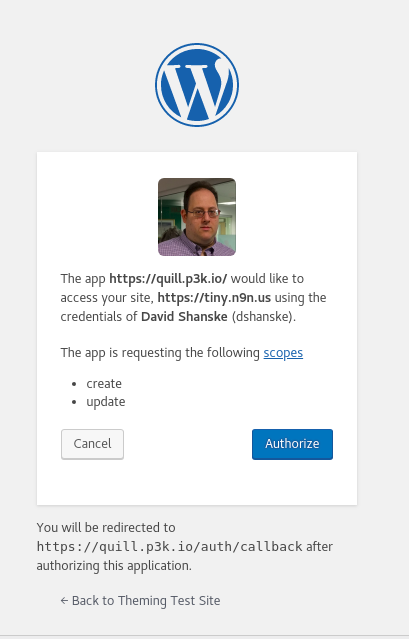
Authorization Prompt for Indieauth for WordPress

So, why did I want to build one? A few reasons. The most popular use for a IndieAuth server as authentication for Micropub clients. Micropub is a standard for creating posts using third-party clients.

WordPress is moving toward deprecating their post interface in favor of a totally new one called ‘Gutenberg’. As a long time WordPress user, the focus on this concerns me as it does not necessarily represent my needs or desires as a user of the platform. So, I want to have options.

Currently, OAuth servers for WordPress of all types are limited. The REST API, which was heralded with much optimism, lacks an OAuth authentication method. In fact, it lacks any built-in authentication options other than the WordPress login for external authentication.

There is an incomplete project for an OAuth2 server for WordPress I did get some useful ideas from, however. I also have to thank Aaron Parecki, who wrote a book on OAuth2 and wrote the Indieauth specification, for reviewing my work and giving lots of feedback.

What I’ve built, with help, is a working IndieAuth authentication method that works for the REST API, among other things.

Since I wanted this to be widely adoptable, I needed to make sure of a secure implementation, and I think the results are a good initial version. There is an opportunity for further refinements and improvements, but it means that WordPress users are no longer dependent on Indieauth.com, the reference implementation of the spec which uses OAuth providers like Github and Twitter to authenticate.

This leads to my hopes for the future. There are people working on Micropub clients for Android. And if any of them pans out, or my own mobile options, I could easily post notes to my site from wherever I am using tools that are much more flexible to my needs than are available now, the culmination of nearly 4 years of moving toward this point, on and off.

The success for me will be able to read something on my phone, and quickly share that to my site. Or have a thought and quickly share it to my site, without having to spend so much time setting it up I think better of it.

There are still pieces that need work to achieve that, but this is a major piece knocked off.

This is a test episode of An Indieweb Podcast(working title). In it, Chris Aldrich and I talk about a variety of Indieweb topics, with the theme of Considering the User, inspired by an article we were reading.

Part of this is an opportunity to improve audio post presentation on my website, so you will see audio posts improve over time.

Launching of Weather

With this post, I am launching weather for my website. So, why and what is weather? This is inspired by recent weather events.

In addition to the ability to show a location, I’m also now showing the weather conditions at that location at the time the post was made. So, as this post was made, it was 43 degrees with showers(indicated by the icon).

I may tweak the presentation in future. The new additions to my location plugin include not only displaying the weather on a post, but a sitewide weather display as well as a new option to show the last location reported on a post…Will be testing that and the weather in the coming days as I take a trip.

I have an idea in future to grab this information from my phone, which has a GPS chip, but am not there yet.

Thinking of Homepage Mentions

Going to get a bit technical. This is your only warning.

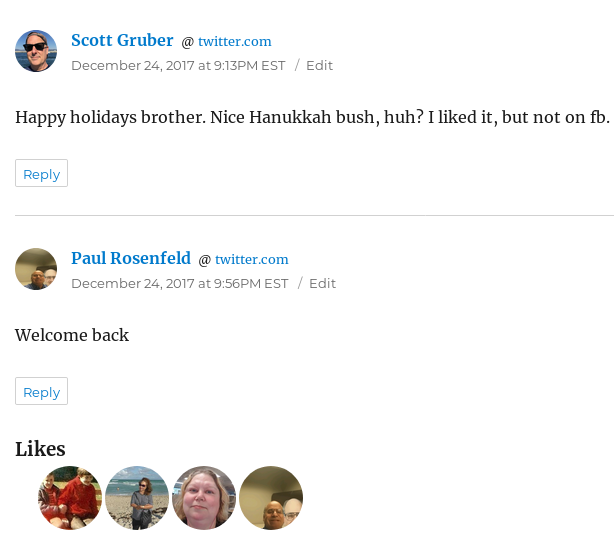
One of the challenges I have been looking at has actually come because of others. Now, if you’ve been looking at my website, you might notice that, thanks to the efforts of myself, Matthias Pfefferle, and Ryan Barrett that there have been major improvements to the presentation of different types of responses on my site. I have a screenshot of the replies on a recent post.

Facepiles, the row of faces representing people who ‘liked’ or what have you, was actually the first project I tackled when I joined the Indieweb community back in 2014. I’ve learned a lot since then.

Either way, the current work not only builds on what I’ve learned, but the contributions by Ryan, who really wanted this feature available, really jumpstarted things. Now, all of these people below don’t know they commented on my site…as they commented elsewhere and I pulled it back to my site via webmention.

So, it brings me to a new problem I want to solve. Homepage mentions. What is that? So, in June, we implemented the ability to direct webmentions(which I’ve talked about before) that reference your homepage as opposed to a specific article to a designated page.

WordPress doesn’t allow the attachment of responses directly to the homepage, and david.shanske.com represents me, having a direct relationship to me on Twitter, Facebook, etc. So, any mention of my website or my username on one of those sites generates a mention that is sent to my site.

This is a problem in display. In recent weeks, I’ve had the following scenarios my website doesn’t yet deal with in a satisfactory way

  • Someone referencing my website as me, effectively tagging me in their post as having been somewhere. Example: With David(david.shanske.com)
  • Someone referencing my website as me in mentioning something I did. Example: David(david.shanske.com) kindly helped me.

Neither of this usages by others are displayed properly website, which is why they are not showing at all. I’m not sure how or where to display them.

Should someone mentioning me in this manner give me the option of generating a post, ala Facebook’s service of letting others post on your timeline, even if I moderate it somehow?

At the least, it should generate a message appropriate to the situation. And if it does, where should it go? Should I display recent mentions on the sidebar of my homepage? On a dedicated page?

The Indieweb declares a person tag as a tag on a post that refers to a specific person by URL and is done as a explicit action. Many of these mentions are explicit, but some are less so.

My goal is by mid January to figure out how I’m going to display these, one way or another, and write some code to do this. Perhaps as my project for Indiewebcamp Baltimore, coming up in late January.


RSVPed Attending IndieWebCamp Austin – December 9-10, 2017 – Austin, Texas

IndieWebCamp Austin 2017 is a gathering for independent web creators of all kinds, from graphic artists, to designers, UX engineers, coders, hackers, to share ideas, actively work on creating for their own personal websites, and build upon each others creations.

Heading to IndieWebCamp Austin.
H-Card is a standard for publishing information about people and organizations online. I have done some work on creating H-Card tools for WordPress.

So, today, I’m going to take some opinions on this and crowdsource some input, since I’m at IndieWebCamp NYC. What belongs on my page in regards to details? Here are some examples.

  1. A better bio of me? I never know what to say about myself.
  2. More places to find me. I was thinking of joining Instagram and posting more photos.
  3. I have my resume up on the site somewhere, but that is different than a bio.

So, any ideas? I’m not good at self-promotion and I know I’m opening myself up by asking the web as a whole.

IndieWebCamp NYC 2017 is happening this weekend, 9/30 and 10/1. I will be there on Sunday only, as I cannot be there the day before. Sunday is Hack and Create day. Hoping to help some people set up their websites if I can, and maybe improve my own.

Looking forward to seeing Tantek Çelik, who has been a fixture at every IndieWebCamp I have attended, and Marty McGuire, who I met at the last IndieWebCamp in NYC. The rest of the attendees I’m not as familiar with. Should be a fun day, following Yom Kippur, which is substantially less fun.