Meta Tags to Microformats

Earlier today, Jamie Tanna announced the opengraph-mf2 library and hosted project. It takes OpenGraph meta tags and converts them to microformats.

I do the same thing as one of the many pieces of my somewhat messy Parse This library. Parse This, which is designed to feed WordPress plugins, forms the basis of the reply-contexts in the Post Kinds plugin, the parsing for the Yarns Microsub plugin, and my newly released bookmarks plugin. In all cases, it tries to extract as much data about the URL sent to it, and return it in microformats 2 json, or the simplified jf2 format.

Jamie’s code is a simple 80 lines that takes a few tags and tries to convert them. I ran through every meta tag I could find by looking at dozens of different sites, so I was inspired to document same.

First of all, if you look at MDN’s definition for the meta tag, it states that if the name property is set, the meta element applies to the entire page, but if the itemprop property is set, that’s user-defined metadata. The content property contains the value for the name attribute. There is no mention of the attribute property in the HTML spec, but it is mentioned in the OpenGraph protocol.

I take name, property, or itemprop and map it to the key in an associative array, then content is the value. For values with curies(:), I use that to create a nested array, which is what I use to map properties.

There are common classic meta names that are longstanding and defined in the HTML specification, such as author, description, and keywords. If nothing else, this might generate some simple information.

Moving up a level to OpenGraph…there are several common metadata fields, namespaced with og.

  • og:title – this would map to p-name
  • Media – Some media has the :secure_url addition for the https version of the image. This is still used, although the modern utility is sometimes questionable.
    • og:image – this would map to u-photo.
    • og:video – this would map to u-video
    • og:audio – this would map to u-audio
  • og:url – this would map to u-url
  • og:description – this would map to p-summary
  • og:longitude, og:latitude can map to the equivalent location
  • og:type – The type is a bit harder to map, but can be used as hinting otherwise. Article as a type would be considered h-entry, profile would be h-card, music and video types would be h-cite.

Of the various types, music and video types are not really represented well in Microformats. So let’s focus on article first.

  • article:published_time – mapped to the dt-published property
  • article:modified_time – mapped to the dt-updated property
  • article:author – mapped to the author property

Many of the types have a tag property, that can have one or more tags…which get mapped to category.

Jamie opted to map the Twitter namespace properties as a secondary factor. I opted not to. The namespace is from their Cards specification, which is really just another OGP namespace. The problem is that they don’t provide an author name or website, only their Twitter handle. The majority of sites I viewed had both the og and the twitter namespaces, and I never got anything from the twitter namespace that wasn’t in the og namespace except Twitter specific details, which I wasn’t interested in. Facebook was responsible for OGP, so most people want to cover both sites, so they have both.

I did opt to look for the custom namespace for FourSquare venues, which is playfourquare, for latitude longitude. I also considered the presence of the namespace to indicate a FourSquare venue, and therefore an h-card.

  • playfoursquare:location:latitude – maps to p-latitude
  • playfoursquare:location:longitude – maps to p-longitude

After the OGP tags, I also looked for some other common meta tag names.

Some academic sources use Dublin Core properties in meta tags:

    • DC.Creator – p-author
    • DC.Title – p-name
    • DC.Date – dt-published
    • DC.Date.modified – dt-updated

Parse.ly, which is part of WordPress VIP, has its own markup.

  • parsely-title – p-name
  • parsely-link – u-url
  • parsely-image-url – u-photo
  • parse-type – post is h-entry, index would be h-feed
  • parsely-pub-date – Publication date
  • parsely-author as p-author
  • parsely-tags as the p-category
  • They also offer the property parsely-metadata for other fields which is json encoded.

I also convert JSON-LD to microformats, but that’s another story

 

IndieAuth 3.5.0 for WordPress Released

Earlier in the week, I noted the release of IndieAuth 3.5.0, but I didn’t explain the major under the hood changes that occurred here in a post, which I need to do as at least one person is experiencing issues(probably necessitating a 3.5.1 as soon as I figure out why.)

I also noted I forgot to describe this clearly in the readme, if people read changelogs and will have to correct that as well.  I wrote some of this code in January and it was merged, but didn’t release it till July, so…

IndieAuth 3.5.0 implements scope support. Previously, scopes were handled by the Micropub plugin. It would check what scopes you had and implement accordingly. But WordPress does not have the concept of scopes. It has the concept of capabilities. And users have roles, which are collections of capabilities.

So Indieauth 3.5.0 implements scopes also as collections of capabilities. If you are doing a capability check in WordPress, and the request was authenticated with an IndieAuth token specifically, it will filter your capabilities by the ones defined in the scopes the token has.

That means if your user didn’t have the capability to begin with, you can’t use it. In a future version, I’ve considered on the authorization screen, not even issuing a token with that scope, but this is ultimately more secure than before.

It means that plugins don’t have to understand scope at all. They just have to enforce and support native WordPress capabilities, which they should anyway.

For now, the system only supports built-in capabilities, but there is nothing that says it cannot move to custom capabilities as needed, as everything is filterable and we accept pull requests.

The second big change I did mention in the changelog brings the code to support using a remote IndieAuth endpoint back into this code. However, it is disabled by default. This is based on the code removed from Micropub, which had a parallel IndieAuth class that was only used when the IndieAuth plugin was not enabled. By having it here, it allows anyone who wants to use it to enable it, but simplifies the experience for the bulk of users. It also allows it to be enhanced by any of the scope or other enhancements put into the main plugin.

The plugin also simplifies the site checks to ensure that your site will work with the plugin, putting them into the Site Health checks where they logically belong. This includes an SSL check and a Authorization header check.

People Seem Confused about IndieAuth

When I first started in the IndieWeb community, IndieAuth confused me. It confused me up until I built an IndieAuth endpoint for WordPress. It may confuse you as well. And that has been a problem in its adoption.

The biggest confusion seems to be conflating IndieAuth and IndieAuth.com. IndieAuth.com is a reference implementation of the protocol built by Aaron Parecki, who edited the IndieAuth specification. Aaron works extensively with OAuth as part of his day job.

OAuth is that technology you see all around the web. It allows you to log into one site using the credentials of another. So, “Sign in with Google”, “Sign in with Facebook”, etc. The site you signed into uses one of these sites to verify your identity.

IndieAuth is a layer on top of that. It allows you to sign in with your website. So, to login you provide the URL of that site, which represents your identity. The client goes and retrieves your site, and looks for hidden links to your IndieAuth endpoints and asks you to verify your identity to it. Then, once you have, it issues permission to the client to act as you, with whatever permissions you have approved.

IndieAuth.com, being a reference implementation, wouldn’t know how to verify your identity. So, it uses a workaround called RelMeAuth. If you put a link on your website to your GitHub account, or other sites that support OAuth, marked up in HTML with rel=”me”, it would go to the sites of those services it supported, check to see if, using the GitHub example, if your GitHub profile had a link back to your website. This would prove your GitHub account and your website were owned by the same person. Then if you could successfully authenticate to GitHub, it would then issue the client the permissions it requested.

Since for IndieAuth.com to work with your site, you had to link to it on your site in a certain way, designating it as the authentication endpoint for that URL, it meant that unless someone had the ability to edit your page(a bigger problem), they couldn’t use it to get into your site.

But IndieAuth.com isn’t meant to be a permanent service and the fact people think that IndieAuth.com = IndieAuth the protocol is a problem. It is meant to be a bridge for people.

So, I came in, naively, when I started using IndieAuth.com and said…I want to do the same thing, but I don’t want to log in using GitHub…I want to log in using my WordPress credentials. So, in 2018, I learned enough to write an IndieAuth endpoint for WordPress. So, you can, instead of putting indieauth.com as your provider, install a WordPress plugin and your site will become a provider.

Try to login with your URL and it will redirect to letting you login with WordPress, then issue credentials to the client in the form of a token that can be revoked from the WordPress admin.

But people continue to see IndieAuth as logging into other websites via IndieAuth.com and therefore via GitHub…that can certainly be a service and a thing you can do. However, that’s not IndieAuth.

So, going forward, I’ve decided that I’ll be disabling the code from the IndieWeb WordPress plugin that allows you to use IndieAuth.com in favor of the built-in solution. Those who want to use an external service will still be able to do so, but this will be an ‘expert’ feature. Because enabling a plugin and it just working is what most people want.

And if it doesn’t work, please report the bug and we’ll fix it.

Planning out the Next Generation of Post Kinds

I’ve been working on the Post Kinds plugin for several years now. It allows the enhancement of WordPress posts into the Indieweb types of posts.

But in the current environment, the question I keep getting asked is: When will it support Gutenberg, the WordPress block editor?

This is something of a problem for me as I do not know how this would work. I really need to talk it out with someone more embedded in the Gutenberg world and see what ideas come.

So, to prepare for that, I need to make a major shift in the way I have Post Kinds set up to disconnect further what happens on the frontend to what happens on the backend. And since Gutenberg uses the REST API to get data, I need to add an endpoint to work with this.

So, there are a few experiments in this regard I am working on. In a previous version of Post Kinds, I switched from storing metadata about a photo in the photo post to storing it in the attachment. WordPress uses a custom post type for attachments to store information about video, audio, images, etc.

This means you can edit the attachment, and separately attach it to the post. So, one of the first things I want to do is enhance that, and add the ‘citation’ post type I’ve been contemplating.

Loosely inspired by the old WordPress links manager, this would store the metadata for individual URLs. It would be necessary as I want to be able to turn my website into a Pinboard-esque bookmark archive. Not every bookmark is to be shared in my feed, or even public.

So, ones that are shared would be attached to a post, similar to the way attachments are. But otherwise could be addressed as simply bookmarks.

Over the last week, I experimented heavily with a simple fields API to generate the forms fields by configuring an array. The idea here is to define the fields I need for any given post kind, and therefore generate them automatically, rather thanm writing templates.

So, both of these ideas are elements of what I want to build. The challenge is the UI to bring these pieces together. It is going to require some trial and error on my part to get it right.

Right now, after having merged in the Fields file, which I will eventually hook up to the form interfaces, I will be finishing the Citation Edit UI, and then seeing how I can link that to posts, taking the attachment model.

Then working on how to properly save and edit the combined post.

Thoughts?

Micropub for WordPress 2.1.0 Released

Micropub version 2.1.0 for WordPress was released. It contains no exciting new features as Micropub is fairly stable.

  • Micropub now checks WordPress capabilities more effectively. It will now throw an error if the user tries to edit a post authored by another user if they do not have that permission, for example.
  • Default Titles and captions weren’t being set for images when uploaded.
  • Fix a variety of timezone related bugs
  • Added support for the proposed draft scope. If the token has this scope and not the create scope, then it will only allow posts to be created as drafts.
  • Return the created URL in the Micropub response to support an automation use case.
  • Add filters to allow a custom post type or custom taxonomy to be set during creation.
  • No longer support the ‘post’ scope as permission to do anything. It will map to a combination of create and update.
  • Misc unit test tweaks for consistency.

Using the Last Seen Function in Simple Location

One of the features in Simple Location that doesn’t get much notice is the Last Seen functionality.

Simple Location adds a section to your WordPress user profile called Last Reported Location. It allows you to set the last reported location for a given user.  It reports latitude, longitude, altitude, and whether or not the location is public, private, or protected.

In the Simple Location Settings, you can set this to update each time you publish a post if the location isn’t set as private. So it would reflect the last post you made.

This feature can be used in one of two ways. You can add the Last Seen Widget to your page and display the last place you were seen. Alternatively, this can work in reverse. You can set it so your posts will set post location from the last seen location of the author.

But, what use is that if the only way a to update the Last Seen setting is to set it from a post(creating an endless loop) or to set it manually? If you always want to always set a default location, this can be an option.

However, that doesn’t work for me. So, I built a way to update your location from an outside service.

First, you need an IndieAuth token. If you installed the IndieAuth plugin, you can get one manually under Users->Manage Token.

curl -i -H 'Authorization: Bearer FAKETOKEN' -d "latitude=30&longitude=-115&visibility=public" "https://www.example.com/wp-json/sloc_geo/1.0/user"

Here is an example of updating your location via a curl command line command. It figures out which user based on the user of the token you created.

The parameters currently used are latitude, longitude, altitude(will be automatically derived if not present), and visibility(public, private, protected).

If you are successful, it will return ‘Updated’ and automatically lookup the name of the location you are at.

So, what can you do with this feature? Keeping in mind the day, though I call today Tuesday…Let’s say hypothetically you are in the package delivery business and you want to share your location with the people who are eagerly awaiting your deliveries. You could use this to send your location from your phone to your website to keep the display updated.

Alternatively, if you don’t trust the browser on your computer to know where you are, you could rig up a shortcut on your phone to update the location so it would be accurate if you post, for example on Android with Tasker.

There is more that is needed to enhance this feature. On my list for future is Geofencing…the idea of zones inside which the location would either be set to private or display a generic ‘Home’ or ‘Work’ etc. I already have the code to calculate this, but haven’t figured out how the UI would look. This would allow much more granular controls than the global privacy default.

Syndication Links 4.0.0 Released

Today, from my hotel room in Berlin, Germany, where I am preparing to attend Indiewebcamp Berlin, my first European Indiewebcamp, I released Syndication Links 4.0.0.

The major version number change is because in this version, Syndication Links takes on a new role. As promised previously, I’ve built new syndication code and added supported for Bridgy and Indienews, which both uses Webmentions to trigger a syndication action. This is disabled by default.

As my first live use outside of testing, I’m using the plugin to send this post to Indienews and Twitter(via Bridgy).

The new code adds the concept of a syndication provider, which, when registered, adds the provider as a syndication target for Micropub clients as well as adds it to the WordPress classic editor as a series of checkboxes, er postone for each service.

The Bridgy Publish plugin I announced deprecation on had additional options on a per post and a global level. While the global settings will be coming back in a future version, I likely will not bring back the per-post settings.

Instead, I’d like to add more intelligence behind these decisions, based on other properties of the post. A checkbox is all you should need. The same with auto-syndication. If you decide you want everything to go to Twitter or some site, it shouldn’t check the box…there shouldn’t be a box at all. It should just go, even if there are some more parameters to make that decision…type of post, etc.

So, you are either all in, or in on a per post basis.

I look forward to feedback. This is only the beginning. I hope to do what I did for displaying syndication links, and interface with existing plugins in addition to writing my own integrations.

Simple Location Version 3.4.0 Released

I released a new version of Simple Location this evening. I had to start this project, moving it up my list of things to do because Nominatim started blocking me. I used Nominatim for looking up addresses from coordinates.

Because of that, I completely rewrote the system that registers new location providers so I could more easily create new ones.

  • The Nominatim provider has been switched to now use the Nominatim API provided by MapQuest(Yes, they are still around).
  • You can now use Bing and Google to lookup addresses from coordinates
  • Bing, Google, and Mapquest will now fill in elevation/altitude data on posts if not supplied during lookup, based on their APIs for this.
  • Altitude will display if it is over 500 meters. So, right now, basically if I post on a plane.
  • Location visibility, which is a feature now built into at least one Micropub client, has been enhanced in here. It should work more reliably now.
  • Mapquest and HERE are new static map providers.
  • The conflict with the Jetpack plugin, which added location services in 2017 unknown to me, has been resolved.  If you activate this plugin, it unloads the conflicting Jetpack module.
  • If there is no address to display, it will now display the coordinates.
  • Dark Sky is now an alternate weather provider. I was going to add Weather Underground as well, but they apparently shut down their API.
  • When publishing using Micropub, if coordinates are provided, it automatically generates a display address if none is provided and stores the current weather conditions.
  • The default location visibility checkbox now offers any three of the visibility options… Private, Public, or Protected. Protected is show the display address but not the map or the coordinates.

What’s next for this plugin? Well, better logic around location visibility. Right now, if you do not set it, it goes to a global default.

So, I’d like to include geofencing. That would be a list of zones. Zones would be a location with a radius around it that if you are inside, it would automatically set to protected and/or replace the address with a generic one. For example, if you are within 50 meters of home, it would always use a pre-identified location of ‘Home’ and/or default to a city level description.

The plugin supports Location providers other than the browser. This means that the plugin could query a server to get the current location of the user.

However, there aren’t any I’ve implemented yet really. But this would allow me to query an API to get my location, which has a lot of potential in future, especially if I want to look up my historical location.

For example, I’ve let Google store some of my location history since March of 2013. There is no API I know of to poll the data, but you can export it. I would just have to find a place to import it to. 6 years, 50mb of data. If I had some way to load it up, query it by date and time, I would be able to add location to all posts and photos that didn’t have it, based on the location of my phone at the time the post was made.

I already have a program on my phone that sends my location periodically to my home automation system, but I’d have to try something different to store historical data. There are several options for this. I’m tempted to write something into WordPress, as I have a tendency to build things into my website. Not sure if there is an off the shelf project to suit my needs, though I’ve looked at Aaron Parecki’s Compass. I could build similar functionality into my site to accommodate this, but I think I need something that both my house and my website can query.

Either way, look to see me testing this on my upcoming trip to Indiewebcamp Berlin.


Deprecating and Replacing Bridgy Publish for WordPress

I’ve decided to take a different direction for the Bridgy plugin for WordPress. I’ve never quite been able to explain to people it doesn’t actually do anything. It’s a user interface for the Bridgy service. I’ve decided that the best thing to do is to is to change the approach radically.

Bridgy is a service that integrates with various sites…Facebook, Flickr, Twitter, Github, and sends back comments, likes, etc to the original copies of the same posts on your site. There are a few similar services I’ve integrated with. It also has a feature called Publish where it allows you to syndicate your posts to those services.

This is something of an arms race, as APIs change all the time. Sometimes, there is no official established API. Ryan Barrett, the creator of Bridgy, announced in a blog post this week that due to Facebook API changes scheduled to take effect on August 1st, the Publish features of Bridgy for Facebook would be discontinued at the same time.

I’m writing this partly to lay out my plan in my mind as I’m working on writing this now. I’ve gone through a few different versions of this idea before settling on this.

The Bridgy plugin consists of two parts: The first part is a UI that is added to the post editor that consists of a series of checkboxes, and the corresponding code that triggers the same action from a post made over Micropub. The second part was added last summer, and is basically a registration page for registering for Bridgy.

I’ve opened an issue for discussion on whether I should move the second part into the main Indieweb plugin. Newcomers to the Indieweb could install the plugin, register for Bridgy inside it, and instantly start getting backfeed from other sites.

That brings us to the first part. The checkboxes. They will need to be rewritten, if I want them to continue, for the new post editor, Gutenberg, at some point. But, I don’t just want to syndicate via Bridgy. I want to syndicate to anywhere I can or choose to integrate in, both using the WordPress post editor and Micropub.

So, I’ve decided to integrate the top level of this, the logic that gets a request for syndication from the post editor or Micropub, inside Syndication Links.

Syndication Links displays icons which link to syndicated copies of posts. You’ll see them on this post. I keep adding in integrations to other plugins as people ask. I have Mastodon Auto Post, Keyring Social Importer, Medium, Social Network Auto Poster, and a few more. And I’ll likely continue to look at plugins that syndicate to other sites, figure out where they store their data, and display it as part of this plugin.

But now, this second part will expand the plugin into this territory of being a middleman for actually syndicating content. This is similar to what I did in Simple Location, where I have a series of providers for weather, location, maps, etc. and anyone could write a plugin(though only I have so far) that adds another provider.

To start, the first provider I’ll be including will be a rewritten version of Bridgy Publish, as well as my plan to add Indienews, as both are triggered by sending a webmention to a site.

At the point that I finish the alternative with feature parity to the existing code, I will discontinue development on the separate Bridgy plugin. It will mean one less plugin to maintain. Anyone who does not want to use the new features in Syndication Links…they will be off by default to start with.

It also means that, if I wanted to, I could add native publishing support for services in future. While there are certainly no end of Twitter/Facebook/etc plugins for WordPress, none of them quite understand syndicating a favorite to Twitter doesn’t mean a new tweet, it means something else. I can continue to write integrations for other plugins, or add new providers myself.

Not saying I’m going to do that. I’m only committing to what I’ve said above.

Finally, to all of you who liked the Bridgy Publish plugin…I’m curious to hear your comments on this. Bear in mind, I built the Bridgy Publish plugin to use it, and I still never migrated myself over to it. I would like to finally leave what I am using, and this would mean I could change providers without changing interfaces if I ever add something in future.

How I Set Up My Indieweb WordPress Site – 2018 Edition

This is an update to my 2014 article on how I set up my WordPress site. It was requested I update it.

Standard Plugins

  1. Character Count for Post Content and Excerpt(Link) – Because I need to be aware of the 140 character limit of Twitter, one of the services I send my content to, I need to know the character count of what I’m typing. This adds that to my editing screen. No longer using this plugin and could not find a replacement.
  2. EWWW Image Optimizer(Link) – It reduces file sizes for images to ensure faster loading
  3. Pushover Notifications(Link)or the forked alternative Pushbullet Notifications(Link) for WordPress – This plugin sends notifications of site events to my phone. The Pushover version is actively maintained and allows for extensions.
  4. Simple Local Avatars(Link) – Overrides the default of using the Gravatar service for profile pictures to storing them locally. However, this plugin hasn’t been updated in years. May look for a new one.
  5. WordPress SEO by Yoast(Link) – While I’m not obsessive about Search Engine Optimization, I find this plugin assists in my writing by reminding me about the importance of certain elements. While this is still a popular plugin and good for many people, it’s become a bit too aggressive for me.
  6. The SEO Framework (Link) – Sometimes, I think about getting rid of all SEO plugins. I’m not really obsessed with this. This does add non-Indieweb markup for some sites that require it. It isn’t worth it for me to manually add this right now.
  7. Hum(Link) – This is a simple URL shortener. So for each post, there is an equivalent URL address at di5.us. This allows me to give out easier to enter links to longer post titles.
  8. JSON Feed(Link) – Adds a JSON Feed to a WordPress site. This is an alternative to RSS as a feed. I’ve used it to feed my content to Micro.blog more effectively, as the specification was co-created by Manton Reece, who is the creator of that service. The plugin could stand some enhancement.
  9. Series(Link) – Creates a simple taxonomy called ‘Series’. I added this to my site to allow creating series of articles.
  10. WP Photo Sphere(Link) – For the rare occasions that I post 360 degree images. Rare as in I’ve only posted one.
  11. Social Network Auto Poster(Link) – I keep wanting to get rid of this thing. But I haven’t spent the time to replace it. Thinking of doing that soon.
  12. Simple Location(Link) – You can call this an Indieweb plugin, but it isn’t specifically an Indieweb technology(although it does use Microformats markup). It adds location and weather awareness to a post. So, you can click to add your location and the current weather conditions at that location to a post.
  13. Home Assistant for WordPress(Link) – I use Home Assistant for my Home Automation integration. Since it has an API, I wrote this simple plugin. While at the moment, I hope to add the ability to display information from any sensor and to update a sensor on the Home Assistant side from WordPress, I use it right now as an enhancement to Simple Location. Instead of getting my location from the browser, it gets it from my Home Assistant installation, which tracks my presence.

The Indieweb Stuff

  • WordPress Webmention(Link) – Adds webmention support for WordPress. This allows communications between sites.
  • Semantic Linkbacks(Link) – Adds richer content to WordPress comments received by Webmention. For example, interprets them as reply, repost, like, favorite, mention, etc. This allows different displays and actions to be done with them.
  • Semantic Comments(Link) – One of my own plugins. It changes the display of WordPress comments based on the information from Semantic Linkbacks. It presents the profile pictures in a Facepile for the various types of mentions with the comments separately below. This functionality has now been rolled into Semantic Linkbacks and is even better than it was.
  • Indieweb Taxonomy(Link) – Semantic Linkbacks is all about receiving webmentions for the various semantic types. But this plugin, another one of mine(although I credit several with contributions), adds new terms to WordPress posts for responding to content on another site. So, a post on this site can be a reply to another site, a like, etc. It will automatically send a webmention to the other site, if that site supports it, of course. Replaced by Post Kinds
  • Post Kinds (Link) – This replaced Indieweb Taxonomy. It is a replacement for the WordPress Post Formats which uses Indieweb post types. It allows you to respond to content on other sites, generates previews of those sites for context, allows you to post activity type posts(like watching, listening, reading, etc).
  • Syndication Links(Link) – Another project, which adds fields to a post for the corresponding versions on other networks. It also adds links to same to the post.
  • H-Card Tools – Still under development and not yet available for download, this is just the profile widget marked up appropriately, in the sidebar of the site. Some of this was rolled into the Indieweb plugin
  • Indieweb Plugin(Link) – The Indieweb plugin is not only a plugin installer, but it contains tools for adding rel-me links based on your profile, declaring the default author for your site, and adding a simple h-card widget to show off a primary author.

A Few Choices

  • There is an alternative to my Syndication Links plugin…a plugin called WordPress Syndication (Link).  It automatically adds the links to the post, and extracts the data from a variety of sources that post to other sites. This includes NextScripts Social Network Auto-Poster(Link) or Mailchimp’s Social plugin(Link), and even Bridgy(we’ll get back to Bridgy in a moment).
  • The theme I use is a custom one I built, but the most popular theme for Indieweb sites is Sempress(Link). My theme isn’t quite refined, but if you want it, a copy can be downloaded here. The version in use on my site is just a colored version of the minimal style the theme offers. I am currently using a fork of the WordPress Twenty-Sixteen theme(link) I modified for Microformats and support of the plugins I use.

Bridgy

Bridgy is not a WordPress plugin, or something you need to install(although you can host it yourself). Bridgy now has a WordPress plugin(link) which acts as a UI for registering and posting to Bridgy. Oddly enough, I wrote the plugin, but don’t actively use it. I need to fix my handling of syndication.

Bridgy is a service that you can link your accounts on places like Twitter, Github and Facebook to, and it will pull in comments, likes, etc from those sites and send them to your site to be integrated. This requires the Webmention and Semantic Linkback plugins to understand what is being sent.

To the Future

I enjoy developing this site as a learning tool. I hadn’t done much WordPress development before this and it is very useful to know.

For anyone who comes here considering trying my setup, I’m always available to help. For those who are trying my plugins…they are still being refined, but feedback and contributions(of code) are appreciated.

This site is under development, so it does change regularly. I will often summarize some of the changes with a post, but sometimes not.

IndieAuth for WordPress

Part of my own project for this week, while taking off for the holiday, was to complete work on an Indieauth endpoint for WordPress.

IndieAuth is a layer on top of OAuth 2.0, a standard that grants websites or applications access to their information on other websites but without providing passwords.

OAuth is already being used by a variety of services…Login with Facebook or Login with Google options on sites are usually OAuth based. The difference is that for IndieAuth, users and clients are all represented by URLs.

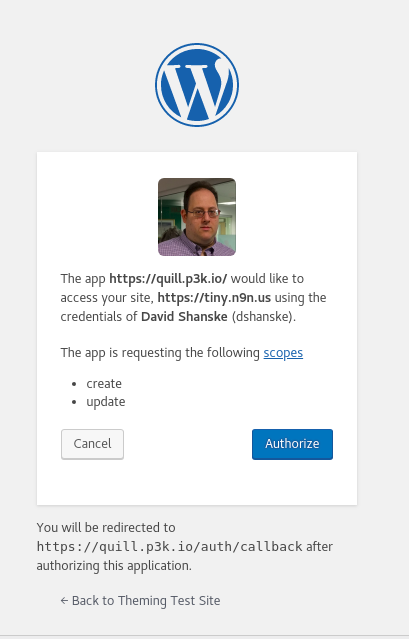
Authorization Prompt for Indieauth for WordPress

So, why did I want to build one? A few reasons. The most popular use for a IndieAuth server as authentication for Micropub clients. Micropub is a standard for creating posts using third-party clients.

WordPress is moving toward deprecating their post interface in favor of a totally new one called ‘Gutenberg’. As a long time WordPress user, the focus on this concerns me as it does not necessarily represent my needs or desires as a user of the platform. So, I want to have options.

Currently, OAuth servers for WordPress of all types are limited. The REST API, which was heralded with much optimism, lacks an OAuth authentication method. In fact, it lacks any built-in authentication options other than the WordPress login for external authentication.

There is an incomplete project for an OAuth2 server for WordPress I did get some useful ideas from, however. I also have to thank Aaron Parecki, who wrote a book on OAuth2 and wrote the Indieauth specification, for reviewing my work and giving lots of feedback.

What I’ve built, with help, is a working IndieAuth authentication method that works for the REST API, among other things.

Since I wanted this to be widely adoptable, I needed to make sure of a secure implementation, and I think the results are a good initial version. There is an opportunity for further refinements and improvements, but it means that WordPress users are no longer dependent on Indieauth.com, the reference implementation of the spec which uses OAuth providers like Github and Twitter to authenticate.

This leads to my hopes for the future. There are people working on Micropub clients for Android. And if any of them pans out, or my own mobile options, I could easily post notes to my site from wherever I am using tools that are much more flexible to my needs than are available now, the culmination of nearly 4 years of moving toward this point, on and off.

The success for me will be able to read something on my phone, and quickly share that to my site. Or have a thought and quickly share it to my site, without having to spend so much time setting it up I think better of it.

There are still pieces that need work to achieve that, but this is a major piece knocked off.

Launching of Weather

With this post, I am launching weather for my website. So, why and what is weather? This is inspired by recent weather events.

In addition to the ability to show a location, I’m also now showing the weather conditions at that location at the time the post was made. So, as this post was made, it was 43 degrees with showers(indicated by the icon).

I may tweak the presentation in future. The new additions to my location plugin include not only displaying the weather on a post, but a sitewide weather display as well as a new option to show the last location reported on a post…Will be testing that and the weather in the coming days as I take a trip.

I have an idea in future to grab this information from my phone, which has a GPS chip, but am not there yet.

For three years now, on and off, I’ve been working on a plugin for WordPress called Simple Location. You can see it on many of my posts(View All Location Posts here). It adds a location and optionally a map to posts on my site. It also will change the displayed time and timezone on those posts to match the location(this post is set for Manila, for example, instead of the default of New York).

It is the most mainstream of the plugins I’ve developed, but has only 30 active installations, which suggests location may not be important to that many people who have WordPress sites, or I haven’t made the plugin good enough. I’m working on the latter now. Anyone have any suggestions?

IndiewebPress: Users

This is the one of a series of brainstorming posts I am putting out about how major functional Core changes to WordPress could result in an improved experience for those interested in pursuing Indieweb philosophies in WordPress.

In the Indieweb world, your domain is your identity. This would suggest that most WordPress sites should only have one user…representing the identity of the site. Users, however, represent roles and responsibilities within the system, not necessarily content creators.

In an update to the ‘official’ Indieweb plugin, I, with some encouragement, added the idea of designating a specific user as the ‘identity’ of the site…assuming there was one.  But let’s expand that idea a bit. We have user metadata, we have the ability to define new roles and capabilities. So, what can we do with this but create new possibilities? We can better work what a role is, and add additional properties and behavior to improve the system.

There is a setting for an admin email, for which the suggestion to expand outward has been proposed for 8 years in this vein. This should be a property of any administrative account.

I have an idea I’ve long wanted to implement. It is based on a feature used by Postmatic. People who subscribed to the email service they provided would end up as users on your site. I’d like to see enhancements to the user profile. When trying to add other site profiles to user metadata, I discovered that this being left to the plugins has resulted in a complete lack of consistency.

There needs to be a consistent structure to add data to support URLs on specific other types of sites( for example, Twitter), or every plugin is going to have to retread this. This is the trouble we have with all metadata unfortunately.

That idea of using the user table for outside visitors has a lot of good potential. Commenters could create a profile on your site that could be imported from elsewhere…namely your own website. There is a certain level of trust there, because you would be displaying images and text about a person from another site…however, that is what gravatar does. Why not allow people to do it from their own site?

Gravatar itself is something that WordPress wouldn’t have put in today….a reliance on an outside service. The local avatar trac ticket is also a rather old request. It is time to look at avatars in general…to build a robust local system that is enhanced by gravatar…gravatar should not be that system. We can add in modern themeable profiles for users, as opposed to just archive pages. We can make a much better system for users.

The whole point of the ‘subscriber’ role in WordPress is for people not part of the blog to have an account they can do something with…follow the site, get updates, participate in comments…but this part of WordPress is woefully underused.

IndiewebPress: Connecting Your Site and Mine

This is the one of a series of brainstorming posts I am putting out about how major functional Core changes to WordPress could result in an improved experience for those interested in pursuing Indieweb philosophies in WordPress. This builds on a previous article about improving comments.

In the previous article, I discussed my thoughts on the subject of comments as a structure and what comments could be capable of if that structure was improved. But, when I showed that to several people, the comment was, quite legitimately, that I didn’t explain what could be built on top of that. I had another topic in mind before covering this, but that made me want to document this as well.

Let’s start with webmentions. Webmentions builds on the idea of the two protocols that are built into WordPress: Pingbacks and Trackbacks. Trackbacks have to be discarded from WordPress. There is no verification of them…it is basically letting anyone post something on your site…moderated or not. The other site tells you they’ve linked to you(even if they haven’t) and what to make it look like on your site. And because of this…while I’ve tried to think of ways to save it, I think it needs to, over time, go on the chopping block.

Pingbacks, despite actually verifying that a URL links to where it says it does, currently don’t do anything else interesting in WordPress. The appearance and usage has stagnated. It could be improved on the display side, and I’ve tried to get interest in that…but I’m wondering as we move forward…considering the legacy design issues, the bad feelings, what I would like to see happen with comments, etc…if we should just let Pingbacks stay where they are with only some performance and other minor refinements, and develop Webmentions.

Webmentions have advantages. They support update and delete functionality if the source changes in the future. They have a standard recommended by the W3C(which the previously implemented protocols do not), as well as a dedicated community who has implemented them on their sites.

What was never realized in potential by previous protocols, but Indieweb community members are implementing is the magic. Someone links to your site with a post on their site. They use webmention to tell you that they linked to you. But what your site does at that point is controlled by you. You can parse their post and display it as a comment, or based on how their page is marked up, derive other meaning and relationships from it. You can just use it in a simple counter or stat display to note how many people linked to you. There have been some fun discussions of using it to share bibliographic data.

If you had to pick one thing, webmention is the key building block on which the Indieweb is built. By itself, it requires no trust on the part of the receiver. There is a developing extension called Vouch which allows the sender to provide proof that someone the receiver knows trusts them. And, moderation aside, presentation of this is wholly left to the receiving site. Back to the comment point in the previous article on this, one of the functional WordPress problems is that there is no way for a plugin to declare a custom comment type and tell the theme how to display it or whether to display it at all. You effectively have to hijack the comment template to do this, instead of working with it.

To the point of something like annotations, the idea of fragmentions which allow a specific part of a post to be referenced more effectively…WordPress doesn’t support inline comments of any type or marginalia. There is a trac ticket to implement the W3C’s work on annotations, but WordPress has nothing to allow for displaying this sort of work.

There is a current Webmentions plugin for WordPress that is under continual development. It was created by Matthias Pfefferle, and I have been a regular contributor to it. It handles the functional plumbing of webmentions, but not the improved display aspect. That has been delegated by its creator to a second plugin, Semantic Linkbacks, which attempts to offer the parsing of external sites and deriving information like author(name and photo), etc.

It is worth trying the combination of these. But there is more that can be done here as well. Cover more types, improve the ability to store commenter’s data, etc.